


Notion: Notes, Tasks, AI
4.64.84K Reviews
App Specs
- Version
- 0.6.4091
- Updated On
- License
- Free
- Downloads
- 10,000,000+
- Developer
- Notion Labs, Inc.
- Categories
- Productivity
- Platform
- Android, iOS
Screenshots
 Analysis by AppCompare
I don’t think a productivity app can fix a messy workflow by itself. Before setting up Notion: Notes, Tasks, AI, I’d first decide what I need to remember, what I need to finish, and what information I’ll want to find again. That small bit of planning matters: a workspace with a purpose is useful, while a workspace built just to collect pages can become another place to check.
Start with the work you already do
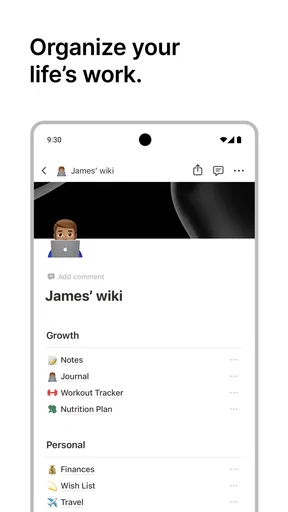
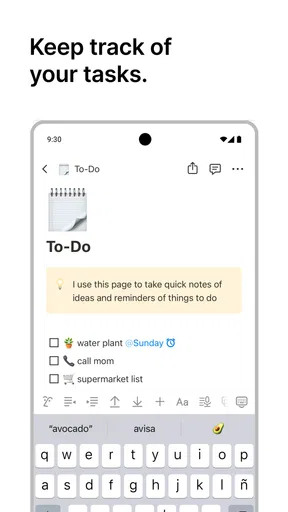
For me, the best starting point is one practical page for a real responsibility: a course, a household project, a client, or a personal goal. I’d put the essential notes and next actions there, then use it for a few days before building anything more elaborate. This shows whether the structure helps me act or simply gives me another system to maintain.
Notion is a productivity app from Notion Labs, Inc., and its appeal is that notes, tasks, and project information can sit in the same workspace. The app is free to start, is rated for Everyone, and has a 4.6 average from around 341,000 ratings. Its reach is substantial, with over 10 million installs, but popularity alone doesn’t make it the right fit: the real question is whether I want a flexible workspace or a narrower tool that does one job with less setup.
Capture first, organize when it earns its keep
When I’m trying a flexible app, I resist making a dashboard for every part of life on day one. I’d capture a meeting note, a shopping reminder, or the outline of a project, then notice what I repeatedly search for. Only those recurring needs deserve a more considered home. This keeps the workspace from turning into a maze of polished pages that are hard to use on a busy day.
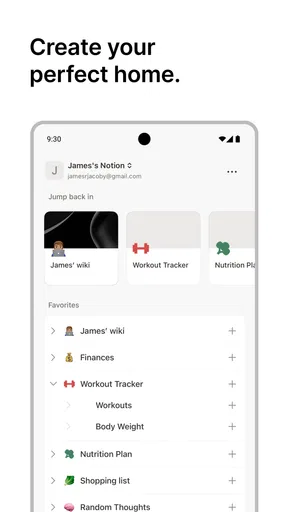
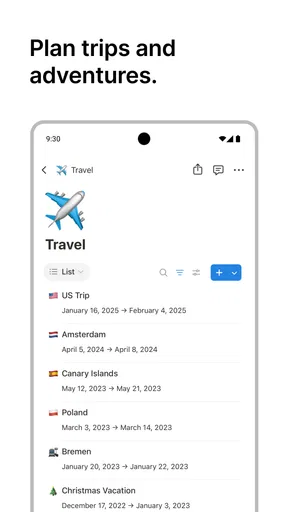
One useful way to think about pages and databases is that they solve different problems. A page is a good home for notes that belong together; a database is more helpful when I need to view and sort many similar items, such as project tasks or reading notes. I would not put every passing thought into a database. A short, plain page can be faster to create and easier to scan, while structured records pay off when I need to compare, filter, or revisit a larger collection.
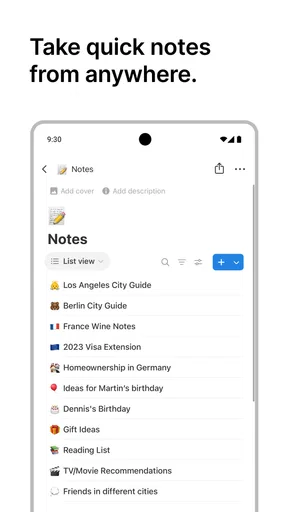
On a phone, the most valuable test is whether I can capture something quickly and trust that I’ll know where to find it later. I’d choose a simple inbox page or a small number of clear destinations instead of creating a long hierarchy. A note called “ideas to sort” can be more practical than deciding the perfect category while I’m walking between errands. Later, I can move useful material into its proper project without interrupting the moment I needed to record it.
Build a repeatable routine, not a museum of templates
A sustainable setup needs a small routine. I’d spend a few minutes at the end of a work session deciding which tasks are still active, what the next action is, and which notes are only reference material. That review is more important than an elaborate home page: without it, old tasks linger and useful notes disappear beneath newer ones. If I share a workspace, I’d also agree with collaborators on what “done” means and where decisions should be recorded.
Worth Reading Before You Choose

Flipboard Shows What News Apps Must Do Beyond the Feed

Switching to Android Auto Means Rethinking Your Driving Routine

Google Calendar Makes a Crowded Week Easier to Manage

Ludo King Makes the Most of the Minutes Between Plans

Baby Panda World Brings Quick Play to Modern Phones, but Its Game Library Feels Busy

ESPN’s Live Game View Makes Following Close Games Easier
A realistic example is planning a weekend move. I could keep the address details and questions on one page, collect packing and booking tasks in a structured list, and add notes after calls with a mover or landlord. The benefit is not that the app performs the move; it is that the decisions and next steps stay connected. The trade-off is that someone who only needs a short checklist may finish faster with a basic to-do app and avoid maintaining a broader workspace.
How it feels to use
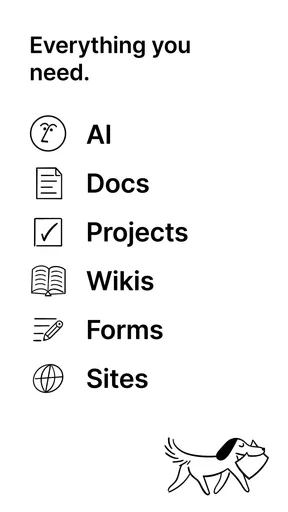
Right off the bat, Notion greets you with a sleek and minimalistic interface that’s both inviting and easy on the eyes. The app is designed to be a one-stop-shop for all your note-taking, task management, and even project planning needs. Whether you’re a student, professional, or someone who just loves staying organized, Notion promises to cater to your needs.
Features Galore
One of the standout features of Notion is its versatility. You can create pages for literally anything you can think of. From personal journals and to-do lists to complex project boards and databases, Notion has you covered. The app supports a variety of content types, including text, images, videos, and even code snippets. This makes it incredibly adaptable to whatever you need it to be.
But wait, there’s more! Notion integrates with a wide range of third-party apps, which means you can pull in data from apps like Slack, Google Drive, and Trello, making it a central hub for all your digital needs.
AI Assistant: Your New Best Friend
Now, let’s talk about one of the most exciting aspects of Notion – its AI capabilities. The AI assistant can help you with a variety of tasks, from generating content ideas to providing quick summaries of lengthy documents. It’s like having a little helper that’s always ready to boost your productivity. I found the AI to be particularly useful when dealing with large amounts of information, as it helps in breaking down complex data into digestible chunks.
I get the most value from an assistant like this when I use it on material I already have: turning a dense set of notes into a concise outline, or asking for a first pass at organizing thoughts before I edit them. I still check the result against the source, especially when the notes contain decisions, dates, or details I can’t afford to get wrong. AI can help me move from a blank page to a workable draft, but it doesn’t replace judgment or make an unclear project clear on its own.
Customizability at Its Best
If you’re someone who loves to personalize your workspace, Notion will be your playground. You can tweak almost every aspect of the app to match your style. From choosing different themes to customizing the layout of your pages, the possibilities are endless. This level of customization is a dream for anyone who wants their digital space to reflect their personality.
My caution is to make customization serve a job. A board, table, or carefully arranged landing page can make information easier to act on, but every extra property or view adds a choice to maintain. I’d begin with only the fields I know I’ll use—for example, a task’s status and the project it belongs to—and add more only when I repeatedly need them. That keeps a database useful instead of turning it into a miniature administrative system.
Collaboration Made Easy
Another feather in Notion’s cap is its seamless collaboration features. You can easily share pages with teammates, friends, or family, and work together in real-time. The app provides granular control over permissions, so you can decide who can view, comment, or edit your content. This makes it an excellent tool for both personal projects and professional teams.
For a group, I’d use shared pages for information people genuinely need to update together, such as a project brief or meeting notes, rather than moving every conversation into a new workspace. Before inviting anyone, it helps to decide who owns the page and who is expected to keep it current. That simple agreement prevents a common collaboration problem: several people assume someone else will update the plan.
The Learning Curve
Now, let’s address the elephant in the room: the learning curve. While Notion is packed with features, it can be a bit overwhelming for first-time users. However, the app provides a plethora of tutorials and community forums that make the process much smoother. Once you get the hang of it, you’ll find that the initial effort is well worth it.
One tip I found helpful was to start simple. Begin with basic note-taking and gradually explore the more advanced features as you become comfortable. Trust me, it won’t take long before you’re navigating like a pro!
On mobile, I’d keep the layout especially restrained. A deeply nested workspace can feel manageable on a larger screen but slow to navigate when I only have a moment to check a task. Clear page names and a small number of top-level areas make a bigger difference than decorative organization. If I mainly need rapid reminders, a dedicated task app may still feel more direct; if I need the context behind a task beside it, this combined approach has an advantage.
Where the friction shows up
The main trade-off is flexibility itself. It takes time to settle on a structure, and that structure can invite tinkering when I should be doing the work. A highly customized setup also asks me to remember how I designed it; if I return after a busy week, I want the next action to be obvious without decoding my own system. I’d periodically remove fields, pages, or routines that no longer help rather than treating every old setup as permanent.
It is also worth separating a note archive from an action list. A page full of meeting notes may preserve useful context, but it won’t necessarily tell me what to do next. I make that distinction explicit by recording a short next action where I’ll see it, then keeping the background material nearby for reference. This is a small habit, but it prevents the satisfying act of writing something down from being mistaken for progress.
Choosing the right level of commitment
The app is a strong match for people whose projects generate both information and follow-up work: students managing research and deadlines, freelancers keeping briefs beside deliverables, or households coordinating a plan that changes over time. It also suits anyone who wants to shape a personal knowledge base rather than scatter notes across separate tools. The current version is 0.6.3684, and it requires Android 8.0 or later, so device compatibility is worth checking before building a routine around it.
I’d skip it if I want a ready-made, no-setup checklist, if I need a specialized calendar to be the center of my day, or if maintaining a workspace sounds like another chore. A basic notes app is often better for quick, linear writing; a dedicated task manager can be better when reminders and fast task entry matter more than linked reference material. Notion’s strength is bringing different kinds of work together, not automatically being the fastest tool for every individual job.
Is It Worth It?
So, is Notion: Notes, Tasks, AI worth the download? In my opinion, absolutely! The app offers a robust set of tools that can truly enhance your productivity. Whether you’re looking to organize your personal life or collaborate on professional projects, Notion has something for everyone.
It is free to begin using, with in-app purchases ranging from $11.99 to $214.99 per item. I’d start with a modest personal setup and see whether the app becomes part of my regular routine before paying for anything. The right choice depends less on how many options are available and more on whether I actually use the workspace to capture, review, and finish work.
However, keep in mind that the free version does have some limitations, particularly when it comes to the number of blocks you can use. If you find yourself hitting these limits, it might be worth considering one of their paid plans, which offer more flexibility and features.
In conclusion, Notion is a powerhouse of an app that lives up to its promise of helping you organize your life. With its blend of flexibility, AI assistance, and collaboration capabilities, it’s a tool that can adapt to your specific needs. Give it a try, and you might just find that it becomes an indispensable part of your daily routine!
Pros
- Highly customizable interface.
- Seamless collaboration features.
- Robust integration options.
- Offline access available.
- AI-powered productivity tools.
Cons
- Steep learning curve for beginners.
- Occasional sync issues.
- Limited free plan storage.
- Mobile app can be sluggish.
- Complexity may overwhelm casual users.
FAQs for Notion: Notes, Tasks, AI
What platforms is Notion available on?
Notion can be accessed on multiple platforms, including Android, iOS, Windows, and macOS. It also has a web version accessible through any browser. This cross-platform availability ensures that your notes, tasks, and projects stay synchronized across all your devices, providing seamless productivity whether you're on the go or at your desk.
Is there a cost associated with using Notion?
Notion offers a free version with a robust set of features suitable for individual use, including unlimited pages and blocks. For more advanced features, such as unlimited file uploads and collaboration tools, there are paid plans available. These plans cater to different needs, from personal use to team and enterprise solutions.
How does Notion's AI functionality enhance productivity?
Notion's AI assists users by offering smart suggestions, automating repetitive tasks, and providing insights for better organization. The AI can help generate content, summarize notes, and even automate workflows, thereby saving time and enhancing focus on more critical tasks. It’s designed to streamline your work process, making it more efficient.
Can Notion be used offline?
Yes, Notion allows offline access on its mobile and desktop applications. While you can create and edit content without an internet connection, these changes will sync once you're back online. This feature is particularly useful for users who need to work in areas with limited connectivity, ensuring uninterrupted productivity.
How secure is my data on Notion?
Notion employs industry-standard encryption to protect your data both in transit and at rest. Additionally, it provides options for two-factor authentication to enhance account security. While Notion takes significant measures to ensure data security, users are encouraged to maintain strong, unique passwords and regularly update them for added protection.


